
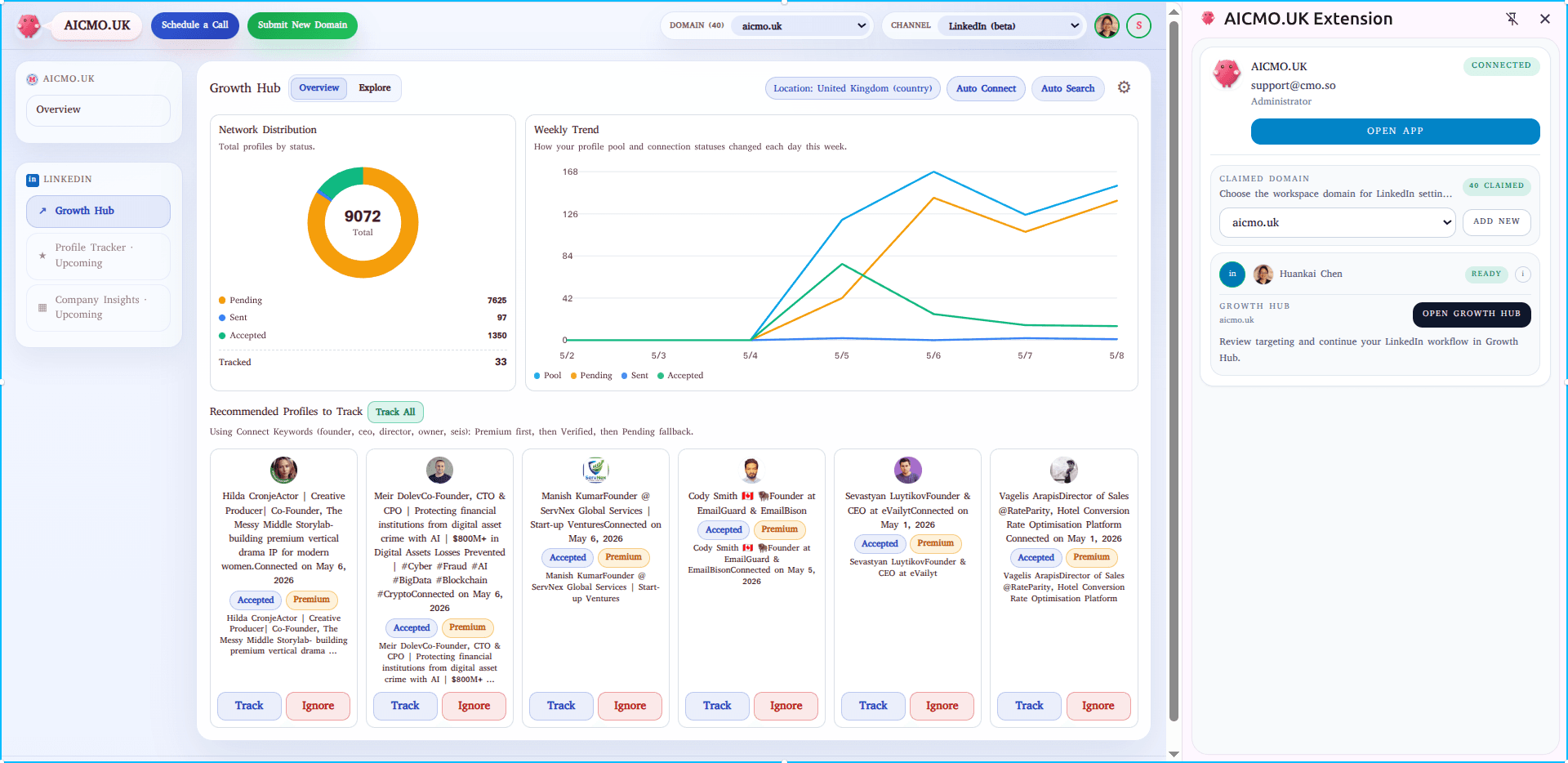
Manual prospecting burns founder time
Searching, filtering, and checking profiles one by one steals hours that should go into product, sales, and customer work.
Two clicks each morning — Auto Search and Auto Connect. The free beta is built for founders and lean teams who need cleaner targeting, safer daily limits, and ICP data that gets sharper over time.
Manual prospecting is the first place founder time gets wasted. Random networking is the second. Most outreach tools fix neither — they just automate the noise.
Searching, filtering, and checking profiles one by one steals hours that should go into product, sales, and customer work.
Without a repeatable targeting workflow, connection growth becomes noisy, inconsistent, and hard to turn into useful market insight.
Maggie does more than automate clicks. She helps collect structured profile data so future ICP analysis gets sharper over time.
Connect once, target once, then run the daily loop in minutes. The plugin handles the repetitive execution while you stay in control of who matters.
Open the side panel, log into your aiCMO account, stay logged into LinkedIn, and claim your domain so the workspace knows which business it is supporting.
Set your target keywords, choose a region like the United Kingdom, and let aiCMO search without repetitive manual browsing.
Filter matching profiles and send connection requests in a controlled way. We recommend staying around 15 connections per day.
Most users only need this. The point of the beta is two key actions instead of a long, manual prospecting session — and a workspace that gets cleaner the more you run it.
Pin click → side panel opens → you're already signed into both aiCMO and LinkedIn from yesterday's session. The Growth Hub is one click away.
Your saved keywords and region are still there. Hit Start and Maggie performs the repetitive searching flow, syncing useful results back into the project while you make coffee.
Skim the matched profiles — you only intervene if something looks off. Targeting cleanup takes a few seconds when it's needed at all.
Daily limit set to 15. Maggie processes connection sending within those bounds in the background. You close the tab and get on with the day.
That's the whole loop. Five minutes. The pipeline keeps moving and the ICP data keeps compounding while you build the product.
The beta is hosted as a ZIP you load into Chrome in Developer Mode. No store review, no waiting — drop in the latest build, claim your domain, you're live.
One-time setup. Once it's loaded, every future update just replaces the folder contents and reloads.
Get the latest hosted build from the panel on the right and keep the extracted folder in a stable local location.
Turn on Developer mode in the top-right toggle of the extensions page.
Click Load unpacked and select the extracted aiCMO extension folder.
Click the puzzle icon, find aiCMO, and pin it for one-click access to the side panel.
Open the side panel, sign in to aiCMO, make sure LinkedIn is open in the same browser. Claim your domain to set workspace context.
LinkedIn automation should be handled carefully. The beta is meant to support repeatable execution, not reckless scale — relevance over volume, every single morning.
Aggressive bulk sending puts the account at risk and trains the algorithm against you. The plugin is designed for a conservative daily rhythm, prefering relevance over volume and giving the operator real review.
A safer founder baseline. Not a guarantee of policy safety — but a far better operating posture than aggressive bulk sending.
The plugin isn't just about sending connection requests. It quietly builds cleaner internal targeting data — the kind of structured signal that makes ICP work actually possible later.
Which keyword combinations surface the right people in your category — not what you guessed in week one.
Roles, seniorities, and patterns that consistently lead to useful conversations vs. noise.
Where geography, function, and seniority overlap most often for your domain — built up across every run.
The shortlist of people whose intent signal is worth attaching to a CRM record or a sales play.
Hosted beta archive. Roll forward to the latest, or roll back to a known-good build by replacing the folder contents and clicking Reload.
Silent sign-in renewal, scheduled Auto Connect controls, clearer run status, and safer refresh and limit handling.
Narrower Chrome permissions, corrected production API routing, stable tracked-profile sync, and quieter operator logs.
Scheduled automation now defaults off, automation event logs are reduced to user-facing updates, and LinkedIn settings gear controls are cleaner icon-only actions.
Most issues come down to four things. If something else breaks, the install doc covers the rest.
Check the extension loaded successfully in chrome://extensions, the unpacked folder still exists in the same location, and Chrome didn't disable it after a restart.
Make sure you're signed into both aiCMO and LinkedIn in the same Chrome profile, and that your session hasn't expired.
The domain claim kicks off research, CMO onboarding, and plan prep behind the scenes. Give it a few minutes, then refresh the workspace.
Replace the unpacked folder contents fully, click Reload in chrome://extensions, and make sure the new ZIP fully extracted before reload.
No. This beta is operator-controlled by design. The value is repeatable execution and disciplined targeting — not unreviewed bulk sending.
Deeper AI-supported ICP analysis for LinkedIn users and company profiles — so the plugin gets stronger at telling you who to target and why.
Download the latest hosted beta, claim your domain, and let Maggie take the manual prospecting drag off your morning. Your founder attention belongs on higher-value decisions.